> ## Documentation Index
> Fetch the complete documentation index at: https://docs.navattic.com/llms.txt
> Use this file to discover all available pages before exploring further.

# Website demos

> Embed interactive demos on your website to increase conversions and qualify leads.

export const MediaCard = ({title = '', url, type = 'demo'}) => {
  const attributes = type === 'demo' ? {
    'data-navattic-open': url,
    'data-navattic-title': title
  } : {
    'data-video': url
  };
  return <div {...attributes} className="hidden md:inline-block w-auto cursor-pointer overflow-hidden rounded-lg border border-gray-200 dark:border-gray-700 shadow-sm">
<div className="flex items-center gap-3 bg-white dark:bg-gray-800 px-3 py-2">
<div className={`flex h-7 w-7 items-center justify-center rounded-md ${type === 'video' ? 'bg-blue-100 dark:bg-blue-900' : 'bg-orange-100 dark:bg-orange-900'}`} style={{
    backgroundColor: type === 'video' ? 'var(--video-bg)' : 'var(--demo-bg)'
  }}>
<Icon icon={type === 'video' ? 'circle-play' : 'square-mouse-pointer'} color={type === 'video' ? 'var(--video-icon)' : 'var(--demo-icon)'} />
</div>
<div>
<div className="text-sm font-medium text-gray-900 dark:text-gray-100">
{type === 'video' ? 'Watch video' : 'Try a demo'}
</div>
<div className="text-sm text-gray-500 dark:text-gray-400">{title}</div>
</div>
</div>
<style jsx>{`
  :root {
    --video-bg: #dbeafe;
    --video-icon: #2563eb;
    --demo-bg: #ffedd5;
    --demo-icon: #ea580c;
  }
  :global(.dark) {
    --video-bg: #1e3a8a;
    --video-icon: #60a5fa;
    --demo-bg: #7c2d12;
    --demo-icon: #fb923c;
  }
`}</style>
</div>;
};

export const CustomerQuote = ({quote, domain, name}) => {
  return <div className="relative rounded-lg border border-gray-200 dark:border-gray-700 bg-gray-50 dark:bg-gray-800 p-4">
      <div className="flex items-start gap-3">
        <div className="flex-shrink-0">
          <Icon icon="quote" />
        </div>
        <div className="space-y-3">
          <div className="m-0 text-sm italic text-gray-700 dark:text-gray-300">{quote}</div>
          <div className="inline-flex items-center gap-2">
            <img src={`https://logo.navattic.com/${domain}`} noZoom alt={domain} className="m-0 h-5 w-5 rounded-full" />
            <span className="text-sm font-medium text-gray-900 dark:text-gray-100">{name}</span>
          </div>
        </div>
      </div>
    </div>;
};

<CustomerQuote
  quote={
<>
"Since launching on our website, Navattic has contributed to <strong>15% of leads</strong>{' '}
that we collect on our site. We've also noticed that there is a much higher propensity to
convert to being a Ramp customer if a prospect has completed the self-service product tour."
</>
}
  domain="ramp.com"
  name="Ramp"
/>

<Icon icon="panels-top-left" /> **Website demos** are concise, easy to follow, and value-driven. Include a demo as the primary or secondary CTA on your site to build product awareness and convert top-of-funnel leads. Use an ungated demo to direct traffic toward your primary website CTA or include a Form to send viewer information to your CRM. Consider linking out to a full-screen version of your demo to provide the most immersive viewing experience.

### Recommendations

For a top-of-funnel audience, we recommend:

* Lead with a value-driven introduction and keep dialog text concise ([Blog: Tips from a Copywriting Expert](https://www.navattic.com/blog/interactive-demo-copywriting-tips))
* Include 10-15 steps that tell a compelling story about your product; try a [Checklist]() to organize longer stories
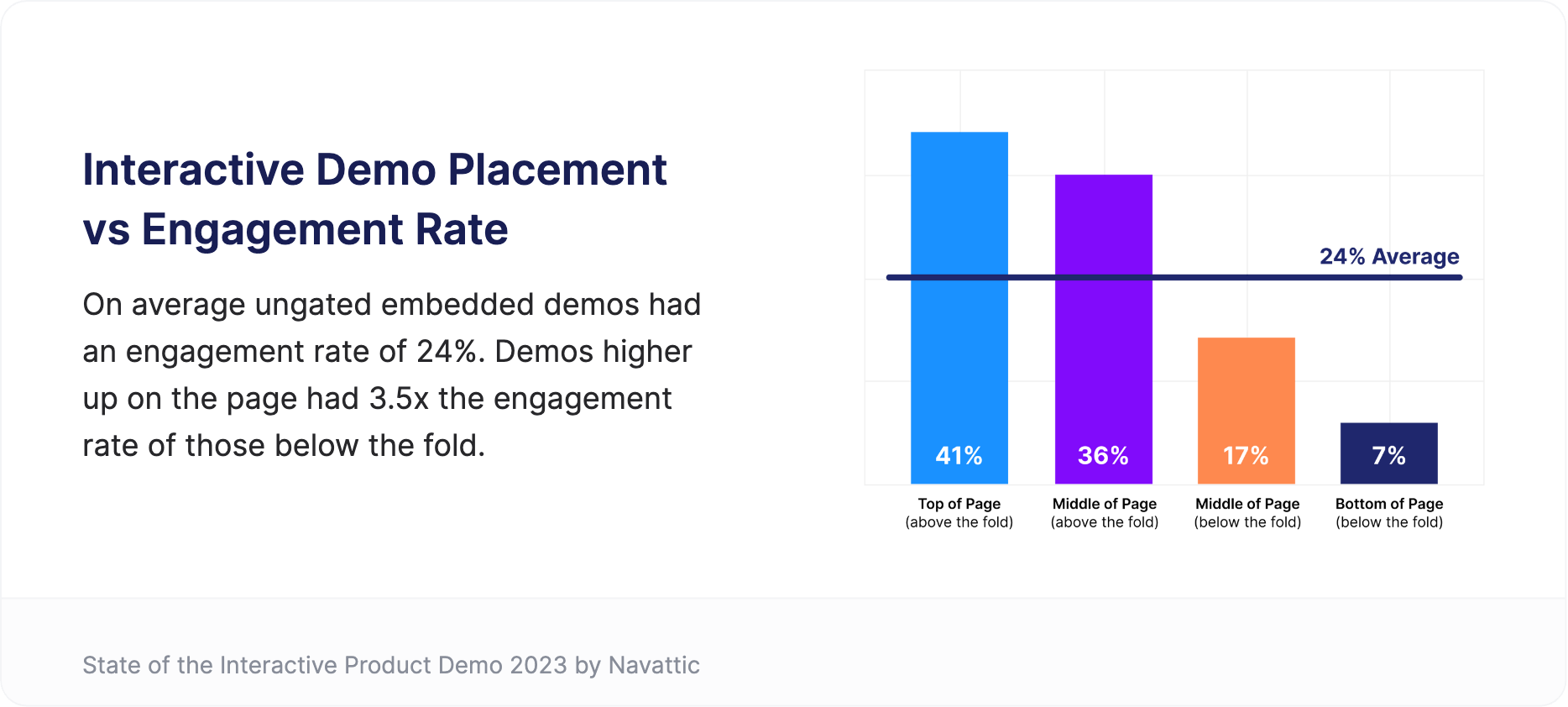
* Embed your demo above the fold for 3.5x website visitor engagement ([How to Promote you Demo](https://www.navattic.com/report/state-of-the-interactive-product-demo-2023#How-to-Promote-your-Interactive-Demo))

### Customer Examples

Below are some customer examples we love. Keep an eye out for the recommendations above.

<CardGroup cols={2}>
  <Card title="Atlan: See Product Tour" href="https://atlan.com/" img="https://mintcdn.com/navattic-app/KyLVfu_TECs3vwBD/images/website-overview-3.png?fit=max&auto=format&n=KyLVfu_TECs3vwBD&q=85&s=20cdb6cb88f525dd8aa80031749432a5" width="2676" height="1262" data-path="images/website-overview-3.png" />

  <Card title="Lattice: Start the Tour" href="https://lattice.com/tour" img="https://mintcdn.com/navattic-app/KyLVfu_TECs3vwBD/images/website-overview-5.png?fit=max&auto=format&n=KyLVfu_TECs3vwBD&q=85&s=91674a57f2799d3b4ec8a2a1d726d497" width="2940" height="1478" data-path="images/website-overview-5.png" />

  <Card title="Traackr: Discover Traackr" href="https://www.traackr.com/influencer-marketing-platform" img="https://mintcdn.com/navattic-app/KyLVfu_TECs3vwBD/images/website-overview-6.png?fit=max&auto=format&n=KyLVfu_TECs3vwBD&q=85&s=815ba6f1f454e676932f06c34b78c912" width="1503" height="590" data-path="images/website-overview-6.png" />

  <Card title="Dailypay: Take a Tour" href="https://get.dailypay.com/" img="https://mintcdn.com/navattic-app/KyLVfu_TECs3vwBD/images/website-overview-7.png?fit=max&auto=format&n=KyLVfu_TECs3vwBD&q=85&s=d15072214b89a31b8a04433786bb1d23" width="2940" height="1598" data-path="images/website-overview-7.png" />

  <Card title="CaptivateIQ: Tour CaptivateIQ" href="https://www.captivateiq.com/product-tour" img="https://mintcdn.com/navattic-app/KyLVfu_TECs3vwBD/images/website-overview-8.png?fit=max&auto=format&n=KyLVfu_TECs3vwBD&q=85&s=bc1e5fa55658f49f1f3c0fd5a6aecf77" width="1619" height="716" data-path="images/website-overview-8.png" />

  <Card title="Calm: Take a Product Tour" href="https://health.calm.com/employers/" img="https://mintcdn.com/navattic-app/v0Oklbk2gDCFKvGX/images/website-overview-9.png?fit=max&auto=format&n=v0Oklbk2gDCFKvGX&q=85&s=f73fdcb75e588286df3eee38ac94cf4e" width="2938" height="1600" data-path="images/website-overview-9.png" />
</CardGroup>

### Implementation Guide

Follow the guidance below to create a high-converting demo for your marketing site. Demos built with these best practices see on average a 20-30% Flow completion and 10-15% conversion rate. Use [Project Analytics](/analyze) to see drop-offs for each step and to continue improving your demo.

<Steps>
  <Step title="Structure">
    **Steps 1-2**: Start with a value-driven introduction (ex. "Our product demo will show you how powerful Ramp can be for your business"). If using a Form, keep it as brief as possible (90% of current demos with forms include just 1-2 fields)]

    **Steps 3-8**: Use Tooltips to highlight a few key features. Remember to include wow moments, skip transitions (e.g., click here to move to next screen), and consider how each feature addresses prospect pain points

    **Steps 9-12**: Get ready to conclude your demo. What is one impressive wow moment you can end on? Include 1-2 differentiated CTAs on your last step.

    <Note>
      **Blog:** Read our [High Converting Interactive Demos Tips from a Copywriting Expert](https://www.navattic.com/blog/interactive-demo-copywriting-tips) for suggestions and customer examples.
    </Note>
  </Step>

  <Step title="CTAs">
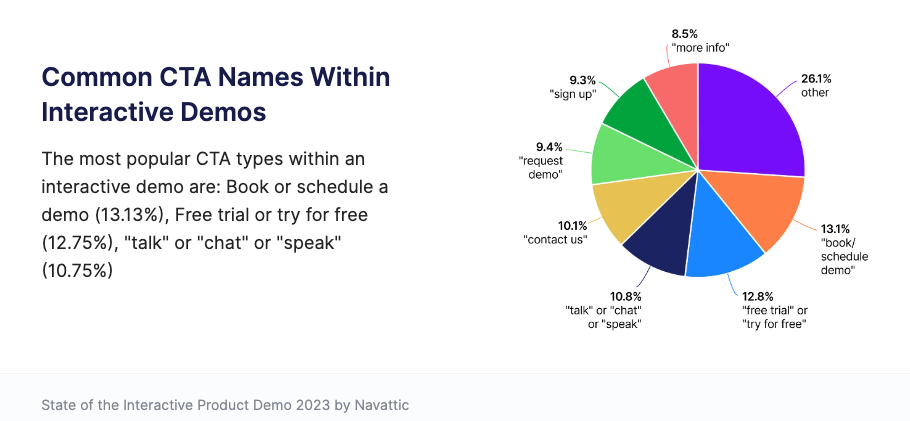
    **Build on momentum**: Include a CTA after showcasing major product wow moments. Encourage conversion after every 5-7 steps or enable [escape view](https://training.navattic.com/7429hwxgx) to make CTAs accessible at any point. **Be consistent**: Maintain the same CTAs across your marketing journey to drive conversions towards your main conversion goal (ie, trial signups, demos booked). Utilize [UTM paramaters](https://blog.hubspot.com/customers/understanding-basics-utm-parameters) to track traffic that originates from Navattic.

    <img src="https://mintcdn.com/navattic-app/KyLVfu_TECs3vwBD/images/website-overview-1.png?fit=max&auto=format&n=KyLVfu_TECs3vwBD&q=85&s=625ddec133ba6b499160ea40788cbb07" alt="" width="910" height="421" data-path="images/website-overview-1.png" />
  </Step>

  <Step title="Gating vs. Ungating">
    We recommend providing both gated and ungated assets on your site. An ungated demo is an instant way to provide value to site visitors and to direct traffic towards your primary CTA. If using a form, we recommend including 1-2 fields within the first 5 steps of your demo. Make sure to integrate with your CRM to create or update contacts with demo engagement data.

    <Note>
      **Tip:** If using a form to gather leads, use [Personalization](/demos/personalized) to turn form fields into dynamic variables (ie., merge fields) that may be referenced throughout your demo.
    </Note>

    **Consider the deployment that shows your product best.** Share your project with end users via a direct link or website embed.Try out various responsiveness strategies and embed settings to find the best fit for presenting your demo. Check out customer example to see different options for successful deployments.

    <Note>
      **Tip:** Showcase your demo or demo CTA above the fold for 3.5x website visitor engagement.
    </Note>

    <img src="https://mintcdn.com/navattic-app/KyLVfu_TECs3vwBD/images/website-overview-2.png?fit=max&auto=format&n=KyLVfu_TECs3vwBD&q=85&s=40b8e5008b8ade46fb7ea50deee958cb" alt="" width="1868" height="842" data-path="images/website-overview-2.png" />
  </Step>
</Steps>

## Customer Interview Series

See how Repsly leverages a demo to drive conversion towards a `Book a Demo` CTA. Read about their strategy in the blog: [Customer Interview Series: Website CTA with Craig LeBlanc](https://www.navattic.com/blog/customer-interview-craig-leblanc)
<MediaCard url="https://www.youtube.com/watch?v=PzHY_7hGuLY&t=1s" type="video" title="Website Overview" />

<MediaCard url="https://youtube.com/clip/Ugkx69JcHJm5inAmaALPGEZps5pxFVZXaYkU" type="video" title="Website Overview" />
