> ## Documentation Index
> Fetch the complete documentation index at: https://docs.navattic.com/llms.txt
> Use this file to discover all available pages before exploring further.

# Sales leave-behind

> Provide prospects with interactive demos they can share internally after sales calls.

export const MediaCard = ({title = '', url, type = 'demo'}) => {
  const attributes = type === 'demo' ? {
    'data-navattic-open': url,
    'data-navattic-title': title
  } : {
    'data-video': url
  };
  return <div {...attributes} className="hidden md:inline-block w-auto cursor-pointer overflow-hidden rounded-lg border border-gray-200 dark:border-gray-700 shadow-sm">
<div className="flex items-center gap-3 bg-white dark:bg-gray-800 px-3 py-2">
<div className={`flex h-7 w-7 items-center justify-center rounded-md ${type === 'video' ? 'bg-blue-100 dark:bg-blue-900' : 'bg-orange-100 dark:bg-orange-900'}`} style={{
    backgroundColor: type === 'video' ? 'var(--video-bg)' : 'var(--demo-bg)'
  }}>
<Icon icon={type === 'video' ? 'circle-play' : 'square-mouse-pointer'} color={type === 'video' ? 'var(--video-icon)' : 'var(--demo-icon)'} />
</div>
<div>
<div className="text-sm font-medium text-gray-900 dark:text-gray-100">
{type === 'video' ? 'Watch video' : 'Try a demo'}
</div>
<div className="text-sm text-gray-500 dark:text-gray-400">{title}</div>
</div>
</div>
<style jsx>{`
  :root {
    --video-bg: #dbeafe;
    --video-icon: #2563eb;
    --demo-bg: #ffedd5;
    --demo-icon: #ea580c;
  }
  :global(.dark) {
    --video-bg: #1e3a8a;
    --video-icon: #60a5fa;
    --demo-bg: #7c2d12;
    --demo-icon: #fb923c;
  }
`}</style>
</div>;
};

export const CustomerQuote = ({quote, domain, name}) => {
  return <div className="relative rounded-lg border border-gray-200 dark:border-gray-700 bg-gray-50 dark:bg-gray-800 p-4">
      <div className="flex items-start gap-3">
        <div className="flex-shrink-0">
          <Icon icon="quote" />
        </div>
        <div className="space-y-3">
          <div className="m-0 text-sm italic text-gray-700 dark:text-gray-300">{quote}</div>
          <div className="inline-flex items-center gap-2">
            <img src={`https://logo.navattic.com/${domain}`} noZoom alt={domain} className="m-0 h-5 w-5 rounded-full" />
            <span className="text-sm font-medium text-gray-900 dark:text-gray-100">{name}</span>
          </div>
        </div>
      </div>
    </div>;
};

<CustomerQuote
  quote={
<>
  "We use guided experiences to help customers experience the most impactful areas of Coupa in a
  short period of time. In addition to gaining positive feedback from the sales team and our
  customers, we found that several Navattic interactive demos helped influence over{' '}
  <b>$10M of ARR in the latter half of 2022</b>."
</>
}
  domain="coupa.com"
  name="Coupa"
/>

# Goals

A sales leave-behind is exactly what it sounds like — simply put, it is something you leave with prospective customers to maintain momentum after an initial conversation.

Interactive demos make great sales leave-behinds by reinforcing the most memorable moments of your conversation, educating prospects on your product, and **enabling your champions** in the procurement process, especially if additional stakeholders are joining the conversation on a rolling basis.

For a complex buying process with multiple decision-makers, an interactive demo is an excellent way to accelerate the sales process.

<Note>
  **Blog**: Read [How to Use Interactive Demos for Sales Leave
  Behinds](https://www.navattic.com/blog/interactive-demos-sales-leave-behinds) for customer
  insights and examples on this use case.
</Note>

# Recommendations

For leave-behind or enablement demos, we recommend creating multiple bite-sized demos that showcase different aspects of your product. Whenever a specific feature, use case, or persona is discussed on a sales call, reps can link out to the most relevant demo in their follow-up emails.

*Advanced tips to get the most from this use case:*

* **Customize** demos for your recipients with a [watermark](/product-updates#Sci_l), personal video greeting, or [personalization variables](/personalize)
* **Repurpose existing demos** and use [Find and Replace](/product-updates#2PrFw) to add your prospect's company names and logos, providing a highly personalized experience
* **Identify recipients** who open your demo with [query strings](/tracking/identify/visitors#query-strings) or [Account-Based Engagement](https://training.navattic.com/o9fg05mt) - both methods help you identify visitors without using a form gate
* **See viewer activity** via integration with [Slack](https://www.navattic.com/blog/slack-interactive-demos) or your CRM
* **Embed your** [Calendly or Chili Piper booking link](https://training.navattic.com/0u13e0bqe) to encourage prospects to schedule a follow-up - add this and/or other CTAs right after a "wow moment" in your demo

<Note>
  \*\*Tip: \*\*Enable your [Navattic Slack
  integration](https://www.navattic.com/blog/slack-interactive-demos) to receive real-time
  notifications when an identified Visitor or Account views your demo.
</Note>

# Customer Examples

Below are some customer examples we love. Keep an eye out for the recommendations highlighted above.

<CardGroup cols={2}>
  <Card title="Vitally Blueprints" href="https://www.vitally.io/blueprints" img="https://mintcdn.com/navattic-app/Wym34-C-snZlIePn/images/sales-leave-behind-4.png?fit=max&auto=format&n=Wym34-C-snZlIePn&q=85&s=451f109c11ea0530a08c84c7f7d8bede" width="2868" height="1176" data-path="images/sales-leave-behind-4.png" />

  <Card title="Repsly" href="https://www.repsly.com/case-studies/altra" img="https://mintcdn.com/navattic-app/Wym34-C-snZlIePn/images/sales-leave-behind-5.png?fit=max&auto=format&n=Wym34-C-snZlIePn&q=85&s=4ac6467ba987245ae5204319b375fd0b" width="2348" height="784" data-path="images/sales-leave-behind-5.png" />

  <Card title="Jellyfish" href="https://jellyfish.co/platform/resource-allocations/" img="https://mintcdn.com/navattic-app/Wym34-C-snZlIePn/images/sales-leave-behind-6.png?fit=max&auto=format&n=Wym34-C-snZlIePn&q=85&s=dd5c564525fa611adbfbf5a392533b88" width="2838" height="1294" data-path="images/sales-leave-behind-6.png" />

  <Card title="Revlitix's" href="https://www.revlitix.com/product-tour" img="https://mintcdn.com/navattic-app/Wym34-C-snZlIePn/images/sales-leave-behind-7.png?fit=max&auto=format&n=Wym34-C-snZlIePn&q=85&s=588d5ad303494deea58f6e9f7ac005fb" width="2848" height="1200" data-path="images/sales-leave-behind-7.png" />
</CardGroup>

<MediaCard url="https://www.navattic.com/customers/coupa" type="demo" title="Sales Leave-Behind" />

<MediaCard url="https://www.navattic.com/customers" type="demo" title="Sales Leave-Behind" />

***

# Implementation Guide

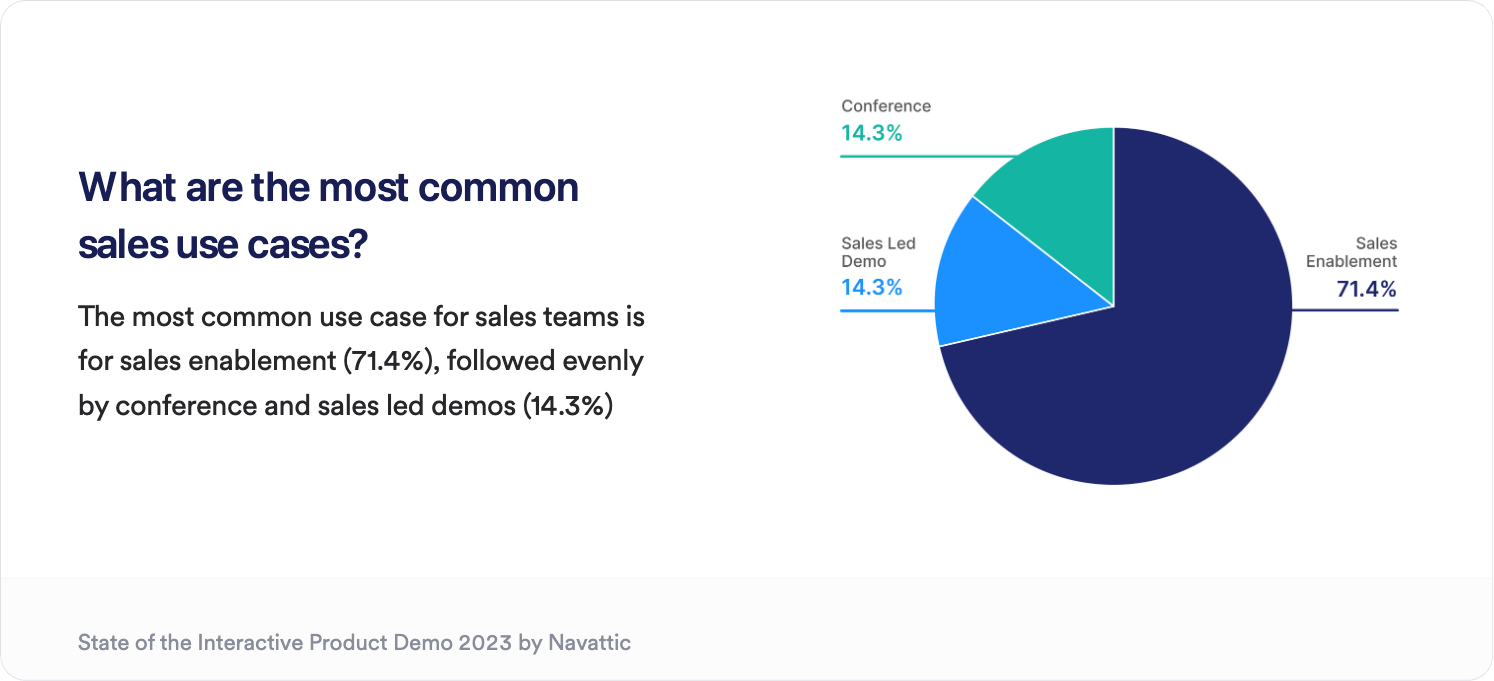
Sales enablement is the **most common sales use case** for interactive product demos. Follow the guidance below to create engaging assets for your champions to circulate in no time.

<MediaCard url="https://training.navattic.com/qw10b37" type="demo" title="Sales Leave-Behind" />

<img src="https://mintcdn.com/navattic-app/Wym34-C-snZlIePn/images/sales-leave-behind-1.png?fit=max&auto=format&n=Wym34-C-snZlIePn&q=85&s=d7147f140c8ead194e6e70626cdaf225" alt="" width="1494" height="681" data-path="images/sales-leave-behind-1.png" />

## 1. Content

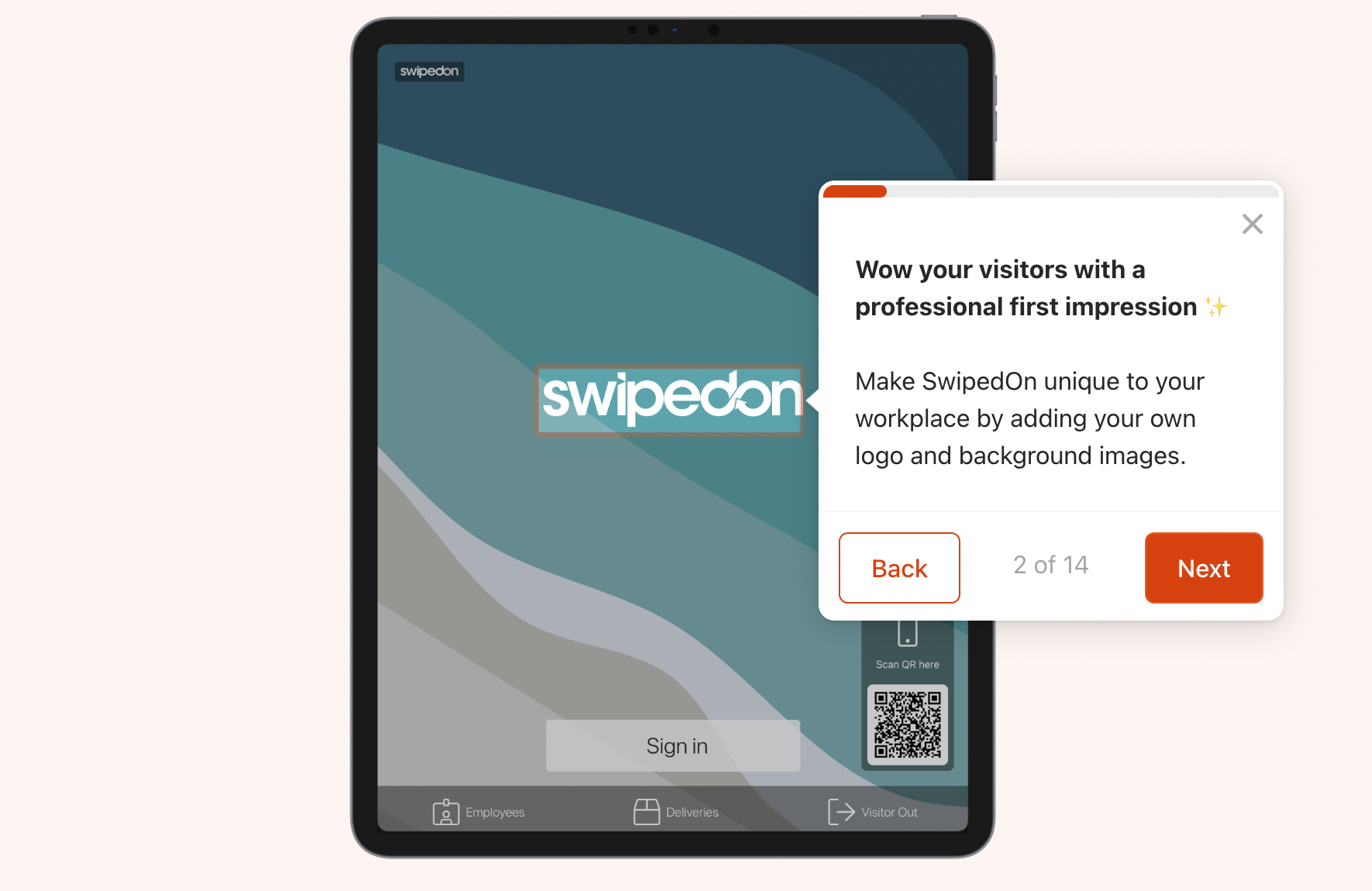
**Make it user-friendly**: Your audience in this use case may be time-constrained. Include [navigation buttons](https://www.loom.com/share/dde828c52d4e4e4e820ddf64b2db5550) and value-driven copy to convey important points quickly. Keep each flow under 15 steps to encourage completion.
<img src="https://mintcdn.com/navattic-app/Wym34-C-snZlIePn/images/sales-leave-behind-2.png?fit=max&auto=format&n=Wym34-C-snZlIePn&q=85&s=9226ba8d5e39e2272527c330a868a3cf" alt="" width="1770" height="1150" data-path="images/sales-leave-behind-2.png" />

**Make it interactive**: Use tooltips, triggers, and beacons to let viewers experience using the product or envision how to integrate it in their day to day.

**Make it personal**: Consider presenting [multiple options](https://swipedon.navattic.com/product-tour-2023) in your demo to accommodate different stakeholder personas, features, or use cases.
<Note>
  **Tip:** Interactive demos are great champion enablement assets. What are questions your champions
  are likely to receive internally, and how can your demo get ahead of common stakeholder concerns?
</Note>

## 2. CTAs

\*\*Be direct: \*\*Include a single CTA at the end of the demo that pushes prospective customers towards the next step in your sales cycle.

**Consider your audience and get creative**: Use the appropriate CTA for each part of the sales journey. Consider linking to customer testimonials, a pricing page, a reference call scheduling page, or other pieces of sales collateral that are well-received by prospects.

Champions and other stakeholders who attended a live demo may have some product familiarity already and could be ready to skip ahead.\*\* **Turn on [**Escape View**](https://training.navattic.com/7429hwxgx)** \*\*to make your demo CTAs accessible at any time.

## 3. Deployment

**Provide options:** Organize demos for various features or buyer personas to help enable your champion. Embed demos side by side on a custom landing page (ex. [Close Interactive Demo Site](https://www.close.com/demo-site)), or use a checklist to present a list of options.

\*\*Share context: \*\*Include a short introduction to your demo or descriptions under each checklist item to help viewers identify the experience that is most relevant to them

\*\*Try ungating: \*\*Remember, sales-leave behinds are used to **mantain momentum** in the sales cycle. Consider ungating to reduce friction and use [query strings](/identify#6kxih) or [Account-based engagement instead.](https://training.navattic.com/o9fg05mt)

<CustomerQuote quote={<>"/product"</>} domain="docs.navattic.com" name="updates#CENjZ" />

## 4. Recommended Structure

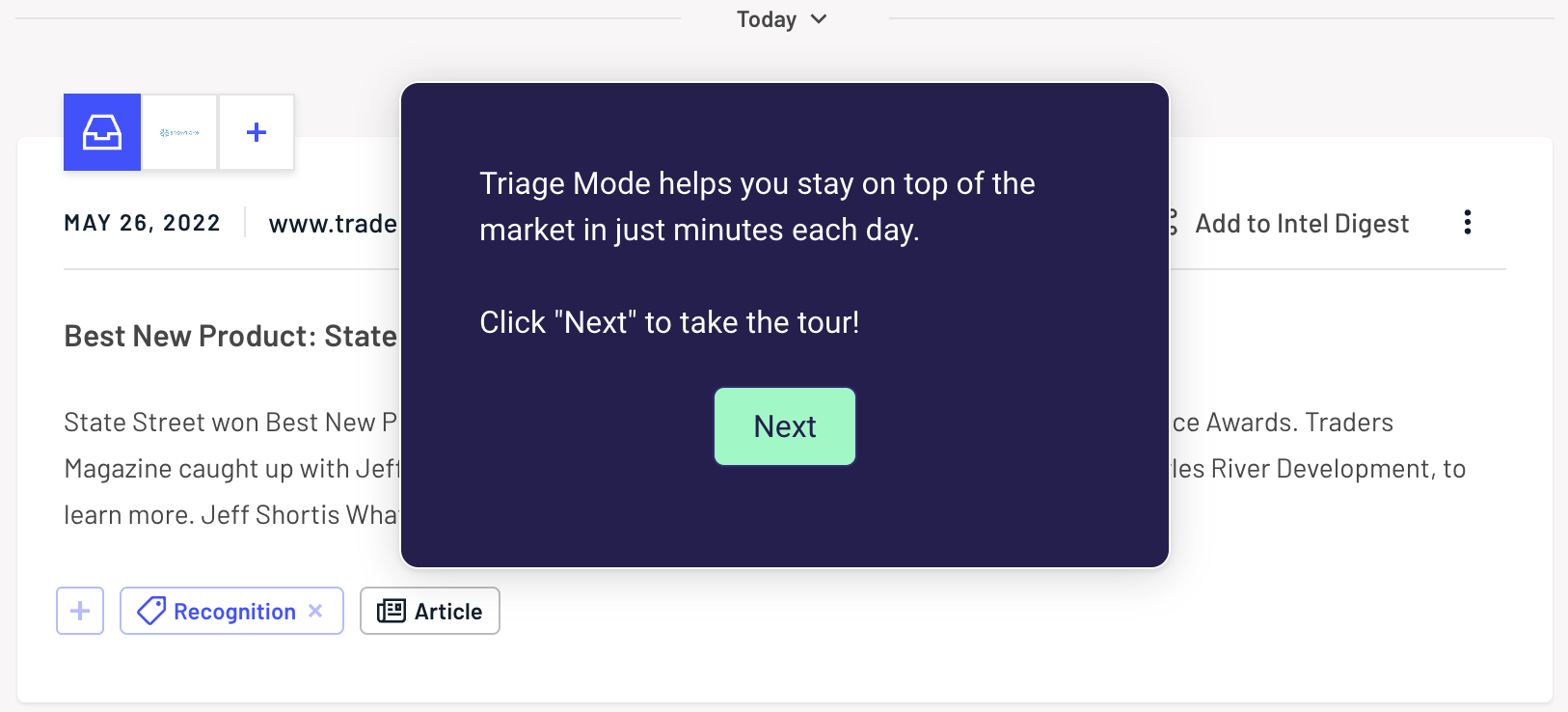
**Steps 1-2:** Share the context for your demo. What does this product do? When is it used? ([Klue's Triage Mode demo](https://klue.com/blog/introducing-triage-mode?utm_campaign=triage%20mode\&utm_source=linkedin\&utm_medium=social\&utm_content=employees#navatic-iframe) is a great example)

<img src="https://mintcdn.com/navattic-app/Wym34-C-snZlIePn/images/sales-leave-behind-3.png?fit=max&auto=format&n=Wym34-C-snZlIePn&q=85&s=0ef11c0747345af4cf2caab50af34ea1" alt="" width="1626" height="738" data-path="images/sales-leave-behind-3.png" />

**Steps 3-9:** Use Tooltips, Beacons, and Triggers to create an interactive experience. Keep text minimal to keep the focus on your product and reinforce those "wow" moments from your previous conversation.

**Steps 10-15:** What is the next step for qualified prospects? Conclude your demo with 1 direct CTA that is related to the next step in your sales process.
