> ## Documentation Index
> Fetch the complete documentation index at: https://docs.navattic.com/llms.txt
> Use this file to discover all available pages before exploring further.

# Feature highlights

> Showcase specific features with focused, interactive product demos.

export const MediaCard = ({title = '', url, type = 'demo'}) => {
  const attributes = type === 'demo' ? {
    'data-navattic-open': url,
    'data-navattic-title': title
  } : {
    'data-video': url
  };
  return <div {...attributes} className="hidden md:inline-block w-auto cursor-pointer overflow-hidden rounded-lg border border-gray-200 dark:border-gray-700 shadow-sm">
<div className="flex items-center gap-3 bg-white dark:bg-gray-800 px-3 py-2">
<div className={`flex h-7 w-7 items-center justify-center rounded-md ${type === 'video' ? 'bg-blue-100 dark:bg-blue-900' : 'bg-orange-100 dark:bg-orange-900'}`} style={{
    backgroundColor: type === 'video' ? 'var(--video-bg)' : 'var(--demo-bg)'
  }}>
<Icon icon={type === 'video' ? 'circle-play' : 'square-mouse-pointer'} color={type === 'video' ? 'var(--video-icon)' : 'var(--demo-icon)'} />
</div>
<div>
<div className="text-sm font-medium text-gray-900 dark:text-gray-100">
{type === 'video' ? 'Watch video' : 'Try a demo'}
</div>
<div className="text-sm text-gray-500 dark:text-gray-400">{title}</div>
</div>
</div>
<style jsx>{`
  :root {
    --video-bg: #dbeafe;
    --video-icon: #2563eb;
    --demo-bg: #ffedd5;
    --demo-icon: #ea580c;
  }
  :global(.dark) {
    --video-bg: #1e3a8a;
    --video-icon: #60a5fa;
    --demo-bg: #7c2d12;
    --demo-icon: #fb923c;
  }
`}</style>
</div>;
};

export const CustomerQuote = ({quote, domain, name}) => {
  return <div className="relative rounded-lg border border-gray-200 dark:border-gray-700 bg-gray-50 dark:bg-gray-800 p-4">
      <div className="flex items-start gap-3">
        <div className="flex-shrink-0">
          <Icon icon="quote" />
        </div>
        <div className="space-y-3">
          <div className="m-0 text-sm italic text-gray-700 dark:text-gray-300">{quote}</div>
          <div className="inline-flex items-center gap-2">
            <img src={`https://logo.navattic.com/${domain}`} noZoom alt={domain} className="m-0 h-5 w-5 rounded-full" />
            <span className="text-sm font-medium text-gray-900 dark:text-gray-100">{name}</span>
          </div>
        </div>
      </div>
    </div>;
};

<CustomerQuote
  quote={
<>
"Our goal is to show customers the value of our product with as little friction as possible,
and to encourage high-intent customers to have more in-depth conversations with sales.{' '}
<strong>Anytime we release a new feature, we make a Navattic demo for it!</strong>"
</>
}
  domain="dooly.ai"
  name="Dooly"
/>

<Icon icon="square-dashed-mouse-pointer" /> **Feature highlight** demos are used to educate prospects and drive more qualified sales conversations. These demos usually have a narrower scope than [Website demos](/use-cases/website-demos), and include more detailed walkthroughs of specific use cases, competitive features, or technical product areas like integrations. Embed feature demos on product landing pages or in your marketing outreach.

### Recommendations

For feature-specific demos, we recommend:

* Keep your demo short (8-15 steps) to quickly show the "wow" moment of that feature
* If your demo is embedded on a landing page, consider an ungated experience (without a form at the beginning)
* Maintain consistent CTAs across each of the feature-specific demos

<Info>
  **Blog**: Read [6 Feature Announcement Examples from SaaS
  Companies](https://www.navattic.com/blog/feature-announcements-examples-from-saas-companies) to see how other customers promote feature demos.
</Info>

### Feature Highlights Customer Examples

Below are some customer examples we love. Keep an eye out for the recommendations highlighted above.

<CardGroup cols={2}>
  <Card title="Dooly: In Action" href="https://www.dooly.ai/see-dooly-in-action/#notes" img="https://mintcdn.com/navattic-app/eEo16-sBVsd0fYuf/images/feature-highlights-2.png?fit=max&auto=format&n=eEo16-sBVsd0fYuf&q=85&s=b508a0c8f0ad88fc2384df8c1cec9df9" width="2528" height="1024" data-path="images/feature-highlights-2.png" />

  <Card title="Udemy: Udemy business" href="https://business.udemy.com/product-tour/" img="https://mintcdn.com/navattic-app/eEo16-sBVsd0fYuf/images/feature-highlights-3.png?fit=max&auto=format&n=eEo16-sBVsd0fYuf&q=85&s=93e3cb174f6de5733c4e9f20da46fecb" width="2940" height="1600" data-path="images/feature-highlights-3.png" />

  <Card title="Datadog: Turn Security into a Team Sport" href="https://www.datadoghq.com/guided-tour/security/" img="https://mintcdn.com/navattic-app/eEo16-sBVsd0fYuf/images/feature-highlights-4.png?fit=max&auto=format&n=eEo16-sBVsd0fYuf&q=85&s=e1090eecf426f42d61eb1337a69f4821" width="2940" height="1594" data-path="images/feature-highlights-4.png" />

  <Card title="Payhawk: Sage Intacct Native Integration" href="https://payhawk.navattic.com/xi4l0t6f" img="https://mintcdn.com/navattic-app/eEo16-sBVsd0fYuf/images/feature-highlights-5.png?fit=max&auto=format&n=eEo16-sBVsd0fYuf&q=85&s=0346932aa1f5822cdf71ffb5ff6e18ef" width="2940" height="1258" data-path="images/feature-highlights-5.png" />
</CardGroup>

### Implementation Guide

Follow the guidance below to launch feature demos in no time. Use [Navattic Analytics](/analyze) to assess completion rates (tip: from your Analytics page, select **Compare All Demos** to view engagement and conversion across all of your demos).

<Steps>
  <Step title="Content">
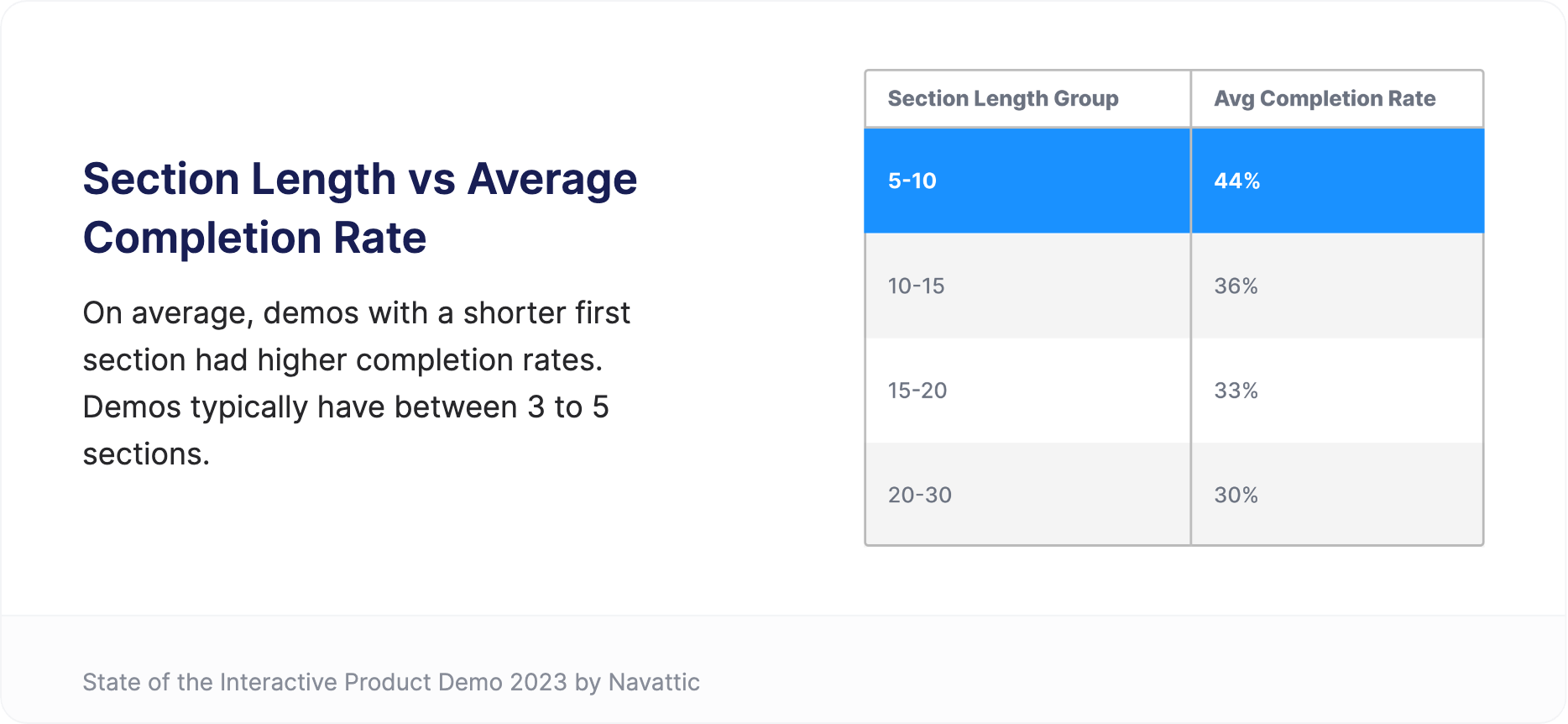
    **Focus on the problem**: Aim for 8-15 steps that highlights the problem a specific feature or use case solves. Skip "how-to" style navigation in favor of value-driven storytelling.

    <img alt="Section Length vs Average Completion Rate" src="https://mintcdn.com/navattic-app/eEo16-sBVsd0fYuf/images/feature-highlights-1.png?fit=max&auto=format&n=eEo16-sBVsd0fYuf&q=85&s=1e7c188ef5ee8c83e9490a302fcb7fdb" size="80" width="1868" height="862" caption="Section Length vs Average Completion Rate" position="center" data-path="images/feature-highlights-1.png" />

    **Make it interactive**: Use tooltips, timer triggers, beacons, and text animation to help visitors envision using this feature in their day to day. \*\*Tip: \*\*for a video-like experience, consider coupling voiceover with timer triggers to create a more automated experience.

    **Skip to the tough stuff**: Use a demo to showcase your product's integrations or features that usually require expert guidance. Let viewers skip the setup and explore integrations at their own pace.
  </Step>

  <Step title="CTAs">
    **Be direct and consistent**: Include a single CTA at the end of the demo that pushes qualified prospects to a sales-led demo, free trial, or gated asset.

    <Note>
      **Tip:** Common conversion CTAs are "Sign up free", "Book a demo", and "Get in touch"
    </Note>
  </Step>

  <Step title="Deployment">
    **Provide options**: Organize demos for various features or buyer personas, or use a checklist to present a list of options (ex. [Navattic: What's New?](https://navattic-docs.navattic.com/y6lv0ayb)). Include a short blurb under each checklist item to help viewers identify the experience that is most relevant to them

    **Try ungating**: Remember, feature demos are used to qualify prospects and to set the stage for more in-depth sales conversations. If gating your demo, enable the Form Setting "Skip if already submitted" to reduce friction for returning visitors.
  </Step>

  <Step title="Recommended Structure">
    **Steps 1-2**: Share the context for your feature. What does this feature do? When is it used? ([Klue's Triage Mode demo](https://klue.com/blog/introducing-triage-mode?utm_campaign=triage%20mode\&utm_source=linkedin\&utm_medium=social\&utm_content=employees#navatic-iframe) is a great example)

    **Steps 3-9:** Use Tooltips, Beacons, and Triggers to create an interactive experience. Keep text minimal to keep the focus on your product - demonstrate how easy and foolproof this feature is to use.

    **Steps 10-12:** What is the next step for qualified prospects? Conclude your demo with 1 direct CTA that is consisent across all feature demos.
  </Step>
</Steps>

## Tip: Drive middle-of-funnel engagement with a Demo Center

For website visitors that already know of your product, centralizing product demos is an effective way to drive site engagement. Include demos of new features or competitive differentiators and try organizing demos by use case or persona to connect prospects with the most relevant content.

**Consider a demo center when you have:**

* Multiple feature demos targeting the same **persona**
* Features that work together to support specific **use cases**
* Demo booths at **in person events** where prospects can explore independently

### Customer Examples

Below are some customer examples we love.

<CardGroup cols={2}>
  <Card title="Digital Ocean: Product Tours" href="https://www.digitalocean.com/product-tours" img="https://mintcdn.com/navattic-app/eD69r1FtqxHvjQao/images/demo-center-3.png?fit=max&auto=format&n=eD69r1FtqxHvjQao&q=85&s=cb473664847b065ff2d4fc5de29a108f" width="1225" height="405" data-path="images/demo-center-3.png" />

  <Card title="Vitally Academy" href="https://www.vitally.io/academy#interactive-product-tours" img="https://mintcdn.com/navattic-app/eD69r1FtqxHvjQao/images/demo-center-5.png?fit=max&auto=format&n=eD69r1FtqxHvjQao&q=85&s=a196c47ecd5b2c86366060424ce8253a" width="2710" height="1418" data-path="images/demo-center-5.png" />

  <Card title="Cvent: Interactive Demo Library" href="https://www.cvent.com/en/interactive-demo-library" img="https://mintcdn.com/navattic-app/eD69r1FtqxHvjQao/images/demo-center-6.png?fit=max&auto=format&n=eD69r1FtqxHvjQao&q=85&s=41b2ccce8dd3d78b2d768ffb80ccf8aa" width="2940" height="1346" data-path="images/demo-center-6.png" />

  <Card title="Close: Interactive Demo Site" href="https://www.close.com/demo-site" img="https://mintcdn.com/navattic-app/eD69r1FtqxHvjQao/images/demo-center-7.png?fit=max&auto=format&n=eD69r1FtqxHvjQao&q=85&s=e06ad821733b59a37b28334b96361d67" width="2940" height="1590" data-path="images/demo-center-7.png" />

  <Card title="Klue: Demo Arena" href="https://klue.com/demo-arena" img="https://mintcdn.com/navattic-app/eD69r1FtqxHvjQao/images/demo-center-8.png?fit=max&auto=format&n=eD69r1FtqxHvjQao&q=85&s=24c5842c7c37f57e6a755eaf0fb27778" width="2940" height="1360" data-path="images/demo-center-8.png" />

  <Card title="UserEvidence: Demo Ranch" href="https://userevidence.com/demo-ranch/" img="https://mintcdn.com/navattic-app/eD69r1FtqxHvjQao/images/demo-center-9.png?fit=max&auto=format&n=eD69r1FtqxHvjQao&q=85&s=4612ac04dde3c5d2feeb0f963d51085b" width="2940" height="1492" data-path="images/demo-center-9.png" />
</CardGroup>

### Customer Interview Series

1. See how **Klue** leverages Navattic for new feature announcements. Read about their strategy in the blog: [Customer Interview Series: Integration Enablement with Jason Oakley](https://www.navattic.com/blog/customer-interview-jason-oakley)

<MediaCard url="https://www.youtube.com/watch?v=tOtOgEYF1gg" type="video" title="Feature Highlights" />
