> ## Documentation Index
> Fetch the complete documentation index at: https://docs.navattic.com/llms.txt
> Use this file to discover all available pages before exploring further.
# Field mappings
> Configure how Navattic syncs data to your CRM integrations.
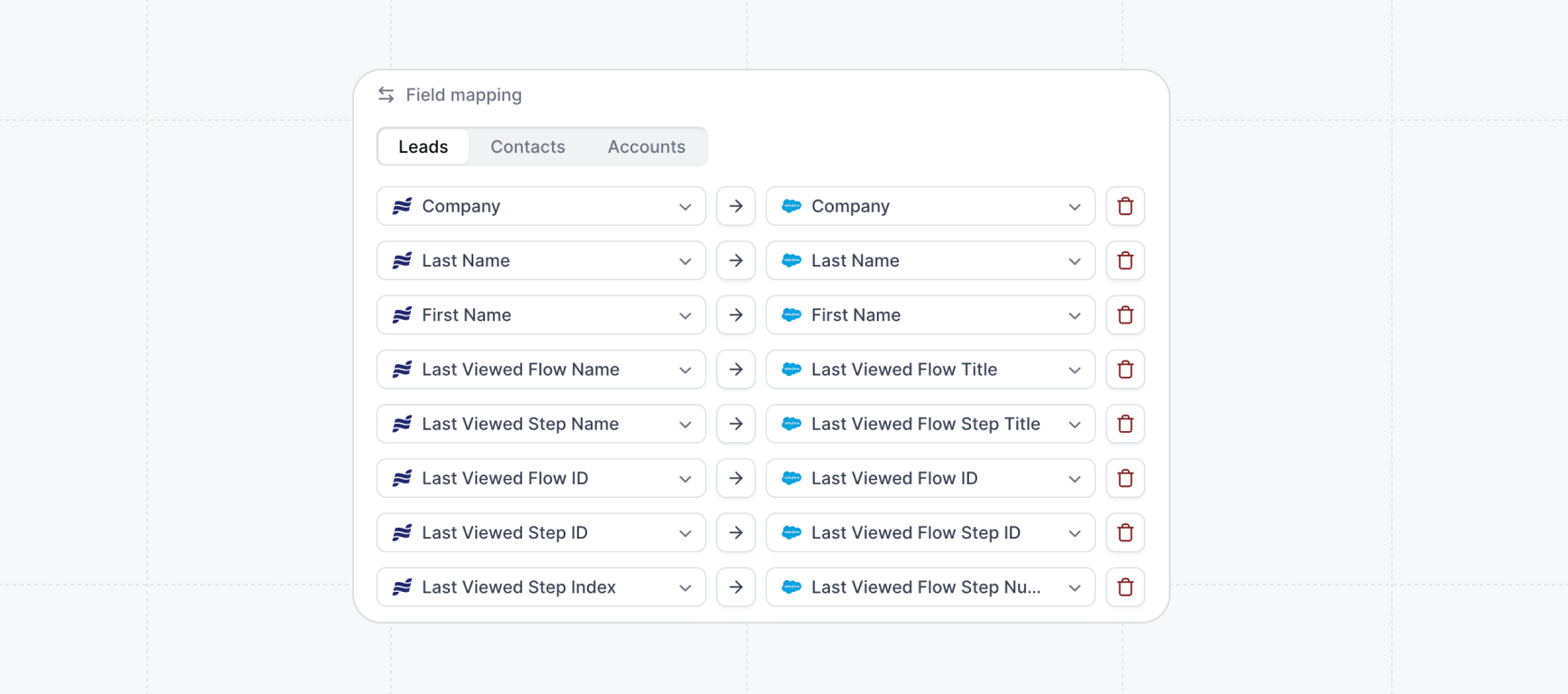 **Field mappings** control how visitor and company data from
Navattic demos flows into your CRM system. This guide covers setup, available fields, and best
practices for [HubSpot](/integrations/hubspot), [Salesforce](/integrations/salesforce),
[Marketo](/integrations/marketo), and [Pardot](/integrations/pardot).
## How to Configure Field Mappings
Field mappings are configured directly within each integration's settings:
1. Navigate to **Settings** → **Integrations** in your Navattic workspace
2. Select your connected CRM integration
3. Click the **Configuration** tab
4. Select **Field Mapping** from the dropdown menu
## Default Field Mappings
Navattic provides standard fields that can be mapped to your CRM. These are organized into Visitor fields (individual contacts) and Company fields (accounts).
| Name | Description | Type |
| ------------------------ | ----------------------------------------------------------------------------------------------------------------------- | ------ |
| Visitor Source | Indicates record came from Navattic | Text |
| Email | Visitor's email address | Text |
| Visitor First Name | First name of the visitor | Text |
| Visitor Last Name | Last name of the visitor | Text |
| Last Viewed Flow ID | Navattic's internal ID for the last flow viewed | Text |
| Last Viewed Flow Name | Human-readable name of the last flow viewed | Text |
| Last Viewed Project ID | Navattic's internal ID for the last demo viewed | Text |
| Last Viewed Project Name | Human-readable name of the last demo viewed | Text |
| Last Viewed Step ID | Navattic's internal ID for the last step viewed | Text |
| Last Viewed Step Name | Human-readable name of the last step viewed | Text |
| Last Viewed Step Index | Numerical position of the last step viewed (e.g., "3" for third step) | Text |
| Session ID | Unique identifier for the demo session | Text |
| Checklist Name | Name of the checklist being followed (if applicable) | Text |
| UTM Content | Campaign content parameter from the demo URL | Text |
| UTM Source | Traffic source parameter from the demo URL (e.g., "email", "social") | Text |
| UTM Medium | Marketing medium parameter from the demo URL (e.g., "cpc", "organic") | Text |
| UTM Campaign | Campaign name parameter from the demo URL | Text |
| UTM Term | Paid search keyword parameter from the demo URL | Text |
| UTM Referrer | Referring URL that brought the visitor to the demo | Text |
| Browser | Visitor's web browser (e.g., Chrome, Safari, Firefox) | Text |
| Current URL | Full URL where the demo was viewed | Text |
| Path | URL path where the demo was viewed (excludes domain) | Text |
| Screen Width | Visitor's screen width in pixels | Number |
| Screen Height | Visitor's screen height in pixels | Number |
| Device | Device type (Desktop, Mobile, Tablet) | Text |
| Operating System | Visitor's operating system (e.g., Windows, macOS, iOS) | Text |
| Agent Demo CTAs | Comma-separated list of CTA button labels clicked during an Agent Demo session. Only populated for identified visitors. | Text |
| Name | Description | Type |
| ------------------------ | ------------------------------------------------------------------------- | ---- |
| Company Source | Indicates record came from Navattic | Text |
| Name | Company name (enriched via Clearbit or form submission) | Text |
| Last Viewed Flow ID | Navattic's internal ID for the last flow viewed by anyone at this company | Text |
| Last Viewed Flow Name | Human-readable name of the last flow viewed by anyone at this company | Text |
| Last Viewed Project ID | Navattic's internal ID for the last demo viewed by anyone at this company | Text |
| Last Viewed Project Name | Human-readable name of the last demo viewed by anyone at this company | Text |
| Last Viewed Step ID | Navattic's internal ID for the last step viewed by anyone at this company | Text |
| Last Viewed Step Name | Human-readable name of the last step viewed by anyone at this company | Text |
| Last Viewed Step Index | Numerical position of the last step viewed by anyone at this company | Text |
| Domain | Company's primary web domain | Text |
| Description | Company description (from Clearbit enrichment) | Text |
| LinkedIn URL | Company's LinkedIn page URL | Text |
| Employee Count | Number of employees (from Clearbit enrichment) | Text |
| City | Company headquarters city | Text |
| State | Company headquarters state/region | Text |
| Country | Company headquarters country | Text |
| Postal Code | Company headquarters postal code | Text |
| Technologies | Comma-separated list of technologies used by the company (from Clearbit) | Text |
## Custom Form Field Mappings
In addition to default fields, you can map any custom form fields from your Navattic demos:
1. Create a form in your Navattic demo with custom fields
2. In field mappings, these custom fields appear automatically
3. Map each form field to corresponding CRM fields
4. Form submissions will populate your mapped CRM fields
### Best Practices for Form Fields
* Keep field names consistent between Navattic and your CRM
* Test form mappings with sample submissions
* Consider required vs. optional fields in both systems
## Next Steps
For integration-specific setup details, see:
}
>
Sync engagement data with Hubspot Contacts, and Companies.
}
>
Sync engagement data to Salesforce Leads, Contact, and Accounts.
}
>
Sync engagement data with Marketo programs.
}>
Sync engagement data with Pardot leads, accounts, dashboards, and workflows.
**Field mappings** control how visitor and company data from
Navattic demos flows into your CRM system. This guide covers setup, available fields, and best
practices for [HubSpot](/integrations/hubspot), [Salesforce](/integrations/salesforce),
[Marketo](/integrations/marketo), and [Pardot](/integrations/pardot).
## How to Configure Field Mappings
Field mappings are configured directly within each integration's settings:
1. Navigate to **Settings** → **Integrations** in your Navattic workspace
2. Select your connected CRM integration
3. Click the **Configuration** tab
4. Select **Field Mapping** from the dropdown menu
## Default Field Mappings
Navattic provides standard fields that can be mapped to your CRM. These are organized into Visitor fields (individual contacts) and Company fields (accounts).
| Name | Description | Type |
| ------------------------ | ----------------------------------------------------------------------------------------------------------------------- | ------ |
| Visitor Source | Indicates record came from Navattic | Text |
| Email | Visitor's email address | Text |
| Visitor First Name | First name of the visitor | Text |
| Visitor Last Name | Last name of the visitor | Text |
| Last Viewed Flow ID | Navattic's internal ID for the last flow viewed | Text |
| Last Viewed Flow Name | Human-readable name of the last flow viewed | Text |
| Last Viewed Project ID | Navattic's internal ID for the last demo viewed | Text |
| Last Viewed Project Name | Human-readable name of the last demo viewed | Text |
| Last Viewed Step ID | Navattic's internal ID for the last step viewed | Text |
| Last Viewed Step Name | Human-readable name of the last step viewed | Text |
| Last Viewed Step Index | Numerical position of the last step viewed (e.g., "3" for third step) | Text |
| Session ID | Unique identifier for the demo session | Text |
| Checklist Name | Name of the checklist being followed (if applicable) | Text |
| UTM Content | Campaign content parameter from the demo URL | Text |
| UTM Source | Traffic source parameter from the demo URL (e.g., "email", "social") | Text |
| UTM Medium | Marketing medium parameter from the demo URL (e.g., "cpc", "organic") | Text |
| UTM Campaign | Campaign name parameter from the demo URL | Text |
| UTM Term | Paid search keyword parameter from the demo URL | Text |
| UTM Referrer | Referring URL that brought the visitor to the demo | Text |
| Browser | Visitor's web browser (e.g., Chrome, Safari, Firefox) | Text |
| Current URL | Full URL where the demo was viewed | Text |
| Path | URL path where the demo was viewed (excludes domain) | Text |
| Screen Width | Visitor's screen width in pixels | Number |
| Screen Height | Visitor's screen height in pixels | Number |
| Device | Device type (Desktop, Mobile, Tablet) | Text |
| Operating System | Visitor's operating system (e.g., Windows, macOS, iOS) | Text |
| Agent Demo CTAs | Comma-separated list of CTA button labels clicked during an Agent Demo session. Only populated for identified visitors. | Text |
| Name | Description | Type |
| ------------------------ | ------------------------------------------------------------------------- | ---- |
| Company Source | Indicates record came from Navattic | Text |
| Name | Company name (enriched via Clearbit or form submission) | Text |
| Last Viewed Flow ID | Navattic's internal ID for the last flow viewed by anyone at this company | Text |
| Last Viewed Flow Name | Human-readable name of the last flow viewed by anyone at this company | Text |
| Last Viewed Project ID | Navattic's internal ID for the last demo viewed by anyone at this company | Text |
| Last Viewed Project Name | Human-readable name of the last demo viewed by anyone at this company | Text |
| Last Viewed Step ID | Navattic's internal ID for the last step viewed by anyone at this company | Text |
| Last Viewed Step Name | Human-readable name of the last step viewed by anyone at this company | Text |
| Last Viewed Step Index | Numerical position of the last step viewed by anyone at this company | Text |
| Domain | Company's primary web domain | Text |
| Description | Company description (from Clearbit enrichment) | Text |
| LinkedIn URL | Company's LinkedIn page URL | Text |
| Employee Count | Number of employees (from Clearbit enrichment) | Text |
| City | Company headquarters city | Text |
| State | Company headquarters state/region | Text |
| Country | Company headquarters country | Text |
| Postal Code | Company headquarters postal code | Text |
| Technologies | Comma-separated list of technologies used by the company (from Clearbit) | Text |
## Custom Form Field Mappings
In addition to default fields, you can map any custom form fields from your Navattic demos:
1. Create a form in your Navattic demo with custom fields
2. In field mappings, these custom fields appear automatically
3. Map each form field to corresponding CRM fields
4. Form submissions will populate your mapped CRM fields
### Best Practices for Form Fields
* Keep field names consistent between Navattic and your CRM
* Test form mappings with sample submissions
* Consider required vs. optional fields in both systems
## Next Steps
For integration-specific setup details, see:
}
>
Sync engagement data with Hubspot Contacts, and Companies.
}
>
Sync engagement data to Salesforce Leads, Contact, and Accounts.
}
>
Sync engagement data with Marketo programs.
}>
Sync engagement data with Pardot leads, accounts, dashboards, and workflows.